
Productivity · Available for Safari & Chrome
PageAssist AI
More than translation, right inside your browser.
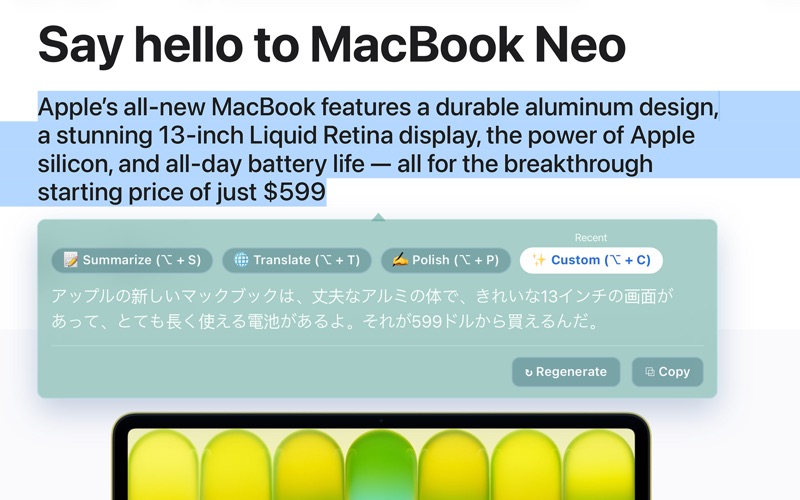
Translate, summarize, polish, or transform selected webpage text with AI in Safari or Chrome—without leaving the page you are reading.
Why PageAssist AI
Selected text becomes useful information in one shortcut.
Translate and summarize in one step
Select text on a webpage and translate it or extract the key points without switching tabs or copying content into another app.
Polish text as you browse
PageAssist AI can rewrite or polish selected text, helping you improve clarity and tone while keeping the original page visible.
Create your own actions
Custom prompts let you define how selected webpage text should be processed, making the extension useful for research, language learning, professional reading, and everyday browsing.
Available for Safari and Chrome
Choose PageAssist AI for Safari on macOS 11 or later, or install the Chrome extension for the same focused, in-browser workflow.
Practical guides
Answers for the moments that bring you here.
Clear, focused guidance based on real questions around PageAssist AI and the problem it is designed to solve.
How-to guide
How to Translate Selected Text in Safari on Mac
Workflow guide
How to Summarize a Webpage in Chrome Without Losing Context
Buyer guide
How to Choose an AI Reading Assistant for Your Browser
Product information